
Description complète
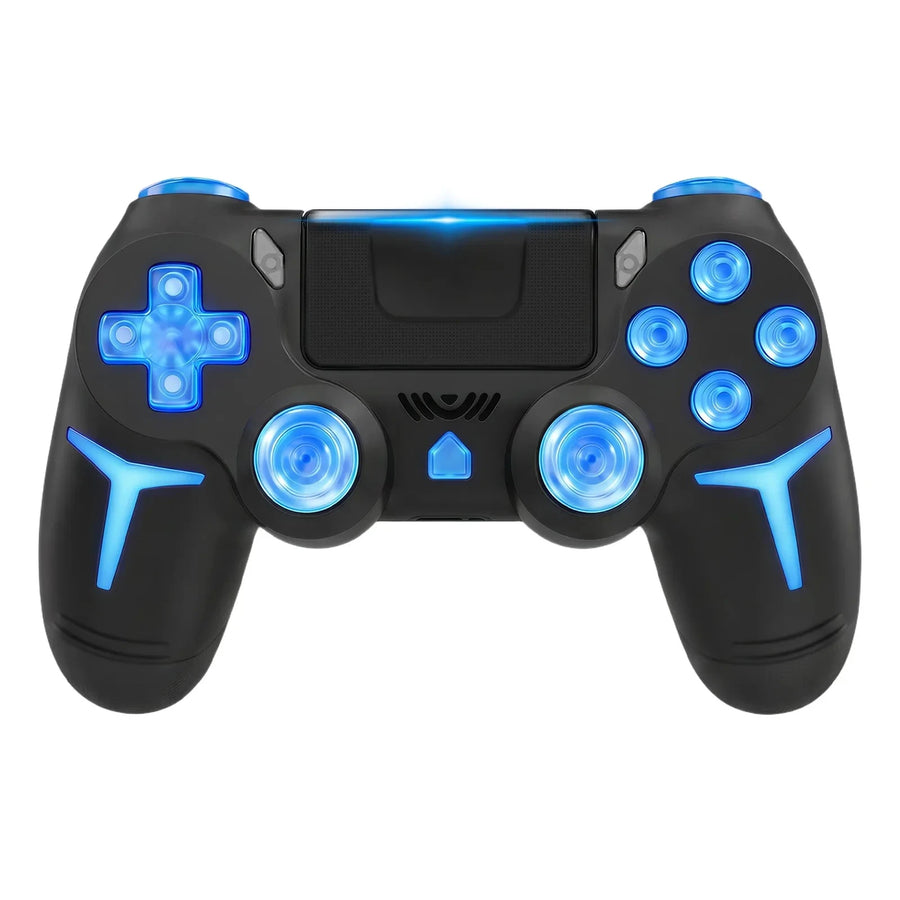
GAMINJA P412: the PS4 and PC controller with RGB lighting
The P412 is the GAMINJA controller that adds RGB lighting to the brand's usual base: Bluetooth link with the PS4 and the PS3, 6-axis gyroscope, multi-touch touchpad and dual vibration. It comes in black or white, with a 600 mAh rechargeable battery.
What it does
- RGB lighting: coloured LEDs on the shell, for a controller that stands out in a gaming setup.
- Multi-touch touchpad: drag, scroll and touch with several fingers, for the PS4 games that use it.
- 6-axis gyroscope: motion sensing for games that use it.
- Dual vibration: two motors, for games that support rumble.
- Bluetooth 4.0: wireless link with the PS4 and the PS3.
- 600 mAh battery: rechargeable with the supplied USB cable.
What it doesn't do
- Conventional potentiometer sticks, not Hall effect: as on most controllers, drift can appear with wear.
- Non-linear L2 and R2 trigger travel, not well suited to fine throttle control in racing games.
- On PC, the connection documented by the manufacturer is the USB cable, with a mandatory first activation by cable: do not count on wireless on a computer.
- The RGB lighting also draws on the 600 mAh battery: for long sessions, keep the cable within reach.
- It is not stated for the PS5, the Switch or Xbox.
- It does not plug into an original retro console (PS1, PS2): no adapter is supplied.
- Supplied without games, in compliance with the law.
Compatibility
Stated by the manufacturer for the PS4 (standard, Slim and Pro) and the PS3 over Bluetooth, and for PCs running Windows 7, 8 and 10 over USB. On the PS3 the touchpad has no use. The PS5, the Switch and Xbox are not in the compatibility list.
Getting started
No assembly. Fully charge the controller before first use. On PS4 or PS3, connect the controller to the console with the supplied cable, press the centre button, then unplug it: the Bluetooth link is remembered from then on. On PC, connect the controller with the USB cable: the first connection activates it.
In the box
- 1 GAMINJA P412 controller
- 1 USB cable
- 1 manufacturer's manual
See also: our retro controllers.
GAMINJA P412 RGB Wireless Controller compatible with PS4, PS3 and PC — light-up, 6-axis gyro
Manette pour PS4, PS3 et PC avec éclairage RGB : pavé tactile multipoint, gyroscope 6 axes et double vibration, en noir ou en blanc.
En stock
📦Livraison en 10 à 18 jours · expédition sous 3 à 5 jours
ℹÀ partir de 150 €, la livraison s’effectue en Point Relais.
- 🇫🇷SAV français
réponse sous 1 jour ouvré - 🛡Garantie légale
2 ans - ↩14 jours
pour changer d’avis - 🔒Paiement sécurisé
CB · PayPal · Klarna
La P412, pour un setup qui s'éclaire
La P412 reprend la base GAMINJA, Bluetooth, gyroscope 6 axes, pavé tactile et double vibration, et y ajoute un éclairage RGB. C'est la manette pour ceux qui veulent qu'elle se voie à côté d'un écran ou d'une console. Elle existe en noir ou en blanc, deux teintes neutres qui laissent la lumière faire le reste.
Un pavé tactile multipoint
Le pavé tactile de la P412 accepte le glisser, le défilement et le toucher à plusieurs doigts. Sur PS4, il sert dans les jeux qui l'exploitent : carte, inventaire, raccourcis. Sur PS3, il reste inactif, la console ne gérant pas cette commande. C'est une fonction utile, mais pas la raison principale de choisir cette manette.
P47, P48 ou P412 ?
GAMINJA vend plusieurs manettes pour PS4 sous des références proches. La P47 se distingue par ses coloris unis et sa charge micro-USB. La P48 existe en version simple et avec micro et prise casque. La P412 est celle de l'éclairage RGB. Toutes gardent gyroscope, pavé tactile et double vibration : choisissez selon l'usage.
What this controller can do
Verified manufacturer specifications · vérifié le
Ce qu’elle fait bien
- Éclairage RGB
- Pavé tactile multipoint
- Gyroscope 6 axes
- Double moteur de vibration
- Bluetooth 4.0 avec la PS4 et la PS3
- Batterie rechargeable de 600 mAh
Ce qu’elle ne fait pas
- Sticks sans effet Hall, sujets à la dérive avec l'usure
- Gâchettes à course non linéaire
- Sur PC, connexion documentée par câble USB uniquement
- Non annoncée pour PS5, Switch ni Xbox
- Ne se branche pas sur une console rétro d'origine
- Livrée sans jeux, conformément à la loi
Voir toute la fiche technique+
Contrôle
- Gâchettes
- Analogiques, course non linéaire
- Retour haptique
- Double moteur de vibration
- Capteur de mouvement
- Gyroscope 6 axes
Connexion et réactivité
- Batterie
- 600 mAh
Frequently Asked Questions
🎮 Fonctionne-t-elle sur PS5 ?
Elle n'est pas annoncée pour la PS5. Le fabricant la donne pour la PS4, la PS3 et le PC sous Windows 7, 8 et 10.
💻 Peut-on l'utiliser sans fil sur PC ?
Le fabricant documente la connexion au PC par câble USB, avec une première activation par câble. Sur ordinateur, prévoyez de jouer branché.
🔌 Comment l'appairer à la PS4 ?
Branchez-la à la console avec le câble fourni, appuyez sur le bouton central puis débranchez. La liaison Bluetooth est ensuite mémorisée.
🖐️ Que permet le pavé tactile ?
Il accepte le glisser, le défilement et le toucher à plusieurs doigts, dans les jeux PS4 qui l'utilisent. Il n'a pas d'usage sur PS3.
🕹️ Les sticks sont-ils à effet Hall ?
Non. Ce sont des sticks à potentiomètres classiques : une dérive peut apparaître avec l'usure.
📦 Que contient le colis ?
1 manette GAMINJA P412, 1 câble USB et 1 notice du fabricant.
🚚 Quels sont les délais de livraison ?
Livraison en 10 à 18 jours, expédition sous 3 à 5 jours.
🛡️ Quelle garantie s'applique ?
Garantie légale de conformité de 2 ans. Retour sous 14 jours.
Why buy here rather than on a marketplace
It is a fair question. Here is the answer, straight.
Every listing is checked before publication: platforms actually supported, stick technology, connectivity, what the controller does not do. Many models never make it into the catalogue.
A question, a pairing problem, a return: you write, a human replies within 1 business day. In French.
The 2-year legal warranty of conformity is handled by us — not by a form on the other side of the world. And 14 days to change your mind, with no need to justify yourself.
We do not claim to be the cheapest. We claim that you will know exactly what you are buying before you pay.
Read this before choosing
Our guides to controllers and what they can drive.

Pixel art: create your own designs for a Divoom display
Grid size, number of colours, outlines, animation: the guide to getting started in pixel art and displaying your own creations on a Divoom display.
2 min de lecture · publié le

Divoom pixel art speakers: which one should you choose?
Astrotoo, Ditoo-Pro, FlowToo, Tiivoo-2, Timebox-Evo, MiniToo, Fairy-OK: the seven Divoom speakers compared, by use and budget.
2 min de lecture · publié le

Times Frame or Times Frame Pure: which Divoom floating photo frame should you choose?
64 or 32 GB, three colours or just one, a dial or not: the real differences between the Times Frame and Times Frame Pure…
1 min de lecture · publié le