

Full description
Internal HDMI kit for PS1: an HDMI port instead of the composite cable
The PS1 was designed for a CRT TV; over composite on a flat screen, its picture becomes blurry and smeared. This Hispeedido internal HDMI kit is soldered onto the motherboard and converts the console's digital signal to HDMI in 480p or 1080p, with a full OSD menu. It targets only two motherboards: PU-18 and PU-20.
What it does
- 480p or 1080p output: six picture formats, three in 480p and three in 1080p.
- OSD menu: three video modes (soft, standard, vivid), Bob, Weave or adaptive deinterlacing, adjustable motion threshold, picture position and size.
- Plastic bracket included: to hold the HDMI board in place inside the console.
What it doesn't do
- It only suits PU-18 and PU-20 motherboards: other PS1 models and the PSone are not covered.
- It cannot be installed without soldering: the board and the ribbon cable are soldered onto the motherboard.
- It adds no detail to games: the PS1 renders most of its images in low definition, and 1080p is an upscale.
- No printed manual is supplied: the installation guide is available on request from our customer service.
Compatibility
PS1 with a PU-18 motherboard (SCPH-550x models) or PU-20 motherboard (SCPH-700x models), according to the manufacturer. The x stands for the region digit: SCPH-5502 and SCPH-7002 for European consoles, for example. The model number is on the underside of the console; the motherboard carries its printed code. Other PS1 revisions and the PSone (compact model) are not covered by this kit.
Skill level required
Advanced. You need to disassemble the PS1 (Phillips screwdriver), free the motherboard, solder the ribbon cable and the board with a fine-tip iron and flux, then check with a multimeter that there is no short circuit. Depending on where you place the HDMI port, cutting the shell may be necessary. Check your installation before closing it up: once soldered, the kit is no longer in its original condition.
In the box
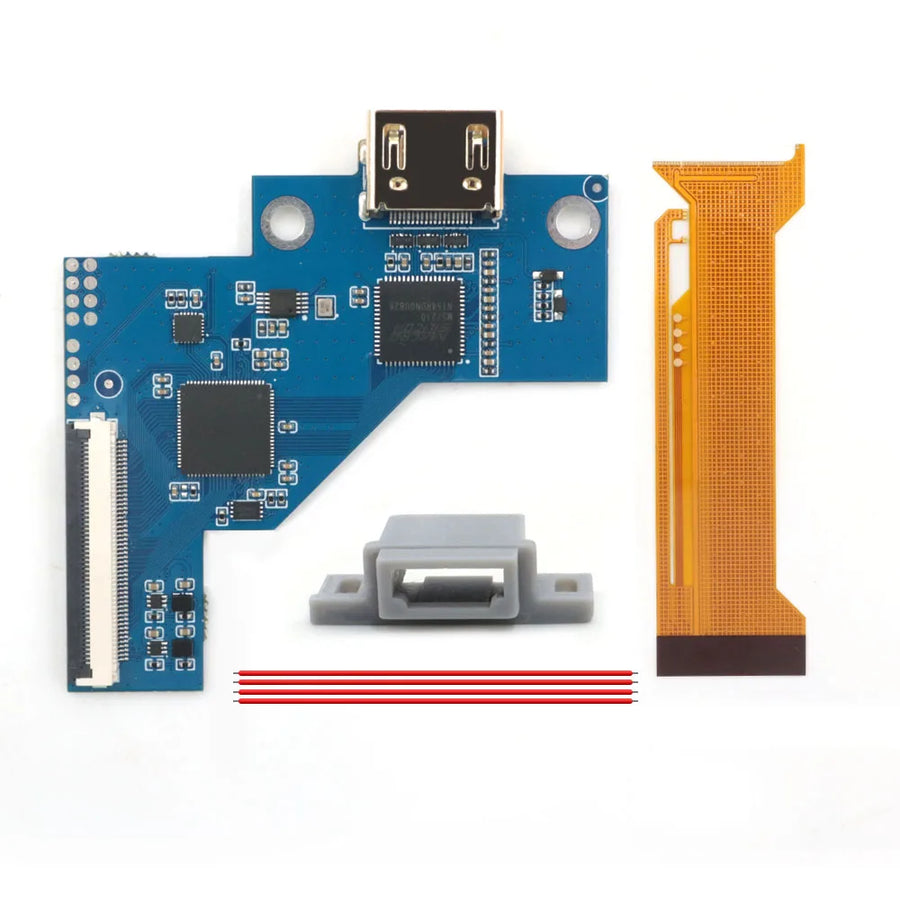
- 1 HDMI board.
- 1 plastic bracket.
- 1 ribbon cable (“With 1 ribbon cable” variant) or 2 ribbon cables, one of them a spare (“With 2 ribbon cables” variant).
The console is not included.
Delivery in 10 to 18 days · dispatched within 3 to 5 days · 2-year legal guarantee · 14-day returns.
Hispeedido internal HDMI kit for PS1 — PU-18 and PU-20 boards, 480p or 1080p
HDMI board to solder inside a PU-18 or PU-20 PS1: 480p or 1080p output and full OSD menu.
In stock
📦Dispatched within 3 to 5 business days · Delivery in 10 to 18 business days · 2-year legal guarantee · 14-day returns.
- 🇫🇷French customer service
reply within 1 business day - 🛡Legal warranty
2 years - ↩14 days
to change your mind - 🔒Secure payment
Card · PayPal · Klarna
The job: a PS1 connected over HDMI
You turn the console over to read its SCPH model number, open it and check that the motherboard is a PU-18 or a PU-20. You then solder the ribbon cable and the HDMI board, fix the board on its plastic bracket, check with a multimeter and close it up. The PS1 then connects to a modern TV with a simple HDMI cable.
The part: a Hispeedido kit for two motherboards
Hispeedido designs modding kits for retro consoles. This kit takes the PS1's digital video signal and outputs it in 480p or 1080p. Its OSD menu sets the video mode, deinterlacing, motion threshold, picture position and six display formats. It is designed for PU-18 and PU-20 boards only.
The support: identifying your motherboard
The kit arrives without a printed manual: our customer service sends you the installation guide and replies within 1 business day. Send us your console's SCPH model number or a photo of its motherboard if you are unsure about compatibility. Have a fine-tip iron, flux, desoldering braid and a multimeter ready.
What this accessory brings
Verified manufacturer specifications · verified on
What it does well
- HDMI output in 480p or 1080p
- Six picture formats
- OSD menu: video modes, deinterlacing, picture position
- Plastic bracket included
What it doesn’t do
- PU-18 and PU-20 motherboards only
- PSone not covered
- Fine soldering required
- 1080p is an upscale
- No printed manual: guide available on request from customer service
See full specifications+
Material and size
- Accessory type
- Internal HDMI kit
Compatible with
- PS1 with PU-18 motherboard (SCPH-550x)
- PS1 with PU-20 motherboard (SCPH-700x)
In the box
- 1 HDMI board
- 1 plastic bracket
- 1 ribbon cable, or 2 ribbon cables including a spare, depending on the variant
Information and safety
Instructions for use and legal information about the product
Spare parts and modding: installation and safety
- Installation is carried out by the user. It requires disassembly or electronics skills and may void the original console manufacturer's warranty.
- Switch the device off and remove batteries before opening it.
- Components sensitive to static electricity: touch a grounded metal surface or wear an antistatic wrist strap before handling them.
- Screens and glass: if broken, the glass can cut.
- Respect the voltage stated on the product page: the wrong power supply destroys the module.
- Contains small parts: not suitable for children under 3.
Origin, responsible person and contact
- Product and packaging as supplied by the manufacturer: markings may be in Chinese or English. The product's characteristics are described on this page.
- Use this product only for the purpose described on this page and follow the instructions below.
- Person responsible for placing this product on the EU market: JMR-Service (Fun-Esports). See our Terms of Sale for full contact details.
- A safety problem (overheating, burning smell, broken part)? Stop using the product and write to us at contact@fun-esports.com.
- Warranty, returns and withdrawal: see our Warranty and returns page.
Frequently Asked Questions
🔧 Do I need to solder to install this kit?
Yes. The board and the ribbon cable are soldered onto the PS1 motherboard. You need to be skilled at fine soldering.
🎮 Is my PS1 compatible?
Yes if it has a PU-18 motherboard (SCPH-550x models) or a PU-20 motherboard (SCPH-700x models). The SCPH model number is on the underside of the console. Other revisions and the PSone are not covered.
✂️ Do I need to cut the shell?
It depends on where you place the HDMI port. Have a mini drill or a file ready if you want the port to be accessible from the outside.
📦 What is in the package?
An HDMI board, a plastic bracket and one ribbon cable, or two ribbon cables including a spare, depending on the variant. No printed manual: the guide is available on request from our customer service.
🧰 What tools do I need?
A Phillips screwdriver, a fine-tip soldering iron, flux, desoldering braid and a multimeter to check that there is no short circuit.
🖥️ Which resolution should I choose, 480p or 1080p?
Both are available in the OSD menu, each with three picture formats. 1080p is an upscale: choose the output that looks best on your TV.
🚚 What are the delivery times?
Delivery in 10 to 18 days, dispatched within 3 to 5 days.
🛡️ What guarantee applies?
2-year legal guarantee of conformity. 14-day returns. Customer service replies within 1 business day.
Why buy here rather than on a marketplace
It is a fair question. Here is the answer, straight.
Every listing is checked before publication: real compatibility, material, dimensions, box contents. Many models never make it into the catalogue.
A question about compatibility, a fit problem, a return: you write, a human replies within 1 business day. In French.
The 2-year legal warranty of conformity is handled by us — not by a form on the other side of the world. And 14 days to change your mind, with no need to justify yourself.
We do not claim to be the cheapest. We claim that you will know exactly what you are buying before you pay.
Read this before choosing
Our guides to accessories: compatibility, protection, transport.

Manette pour smartphone : bien choisir pour le rétro et les jeux mobiles
Trois formats de manettes pour téléphone, et les critères qui départagent : port USB-C, version d'iOS ou d'Android, longueur du téléphone avec sa coque,…
9 min read · published on

Quelle manette 8BitDo choisir selon votre console et votre usage
Récepteur pour console d'origine, SN30 Pro ou Pro 3 sur Switch, Ultimate 2C ou Ultimate 2 sur PC : le tableau usage par usage…
11 min read · published on

Leverless ou stick arcade en 2026 : faut-il passer à la hitbox ?
Vous hésitez à passer au leverless ? Fonctionnement, modes SOCD et règles de tournoi en 2026, jeux concernés, temps d'adaptation, switchs et cartes GP2040-CE,…
9 min read · published on