



Description complète
eXtremeRate Clicky kit for Steam Deck OLED: buttons that click like a mouse
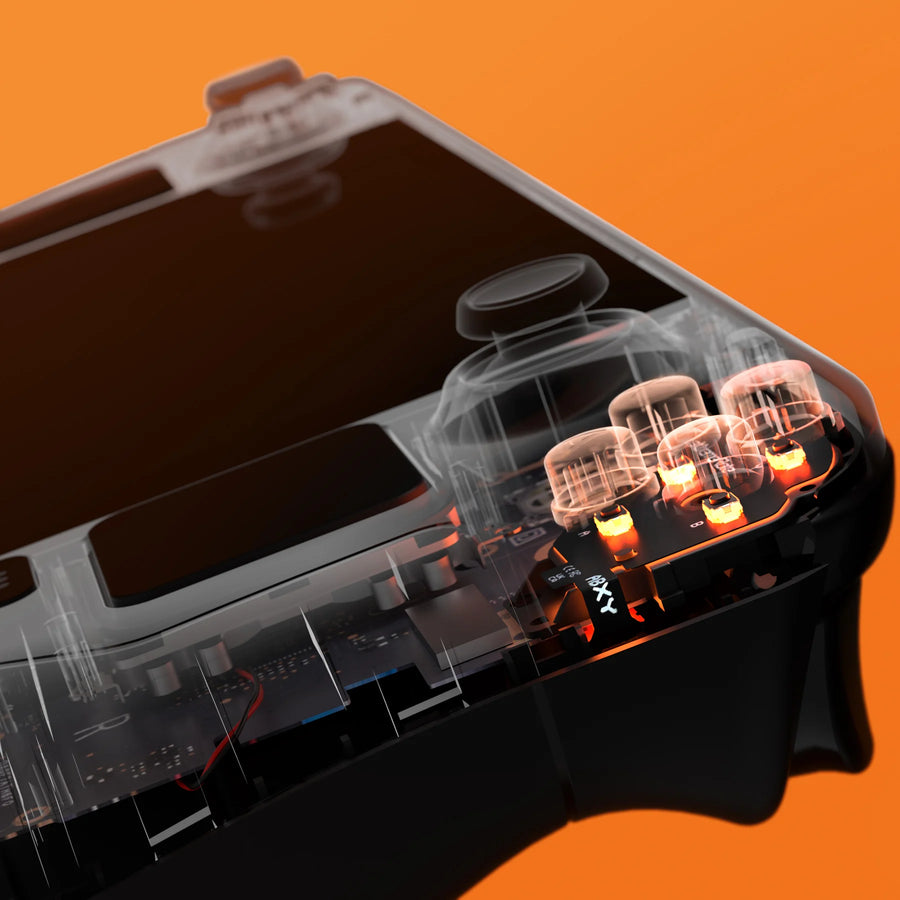
The face buttons of the Steam Deck OLED sit on rubber membranes, soft and quiet. This eXtremeRate kit replaces them with tactile micro-switches with a crisp click, like a mouse button, on the D-pad, ABXY, View and Menu buttons. It fits without soldering and comes in two stiffness levels.
What it does
- Crisp, audible click: each press is confirmed by a click, just like on a mouse.
- Shorter travel: the button actuates earlier than with the original membrane.
- Two stiffness levels: firm version at 1.57 N or light version at 0.98 N of actuation force.
- Tools included: screwdriver, opening tool, screws and springs are in the box.
What it doesn't do
- The buttons are not included. You reuse your console's button caps; neither a console nor any other part is included.
- It is not suitable for the 2022 Steam Deck LCD.
- It does not cover the triggers, back buttons or joysticks.
- The click is audible: this is not a silent kit. The firm version requires more thumb effort than the original buttons.
Compatibility
Steam Deck OLED only. Not compatible with the Steam Deck LCD (2022) or with other handheld gaming PCs. Opening the console may end the manufacturer's commercial warranty.
Skill level required
Intermediate to advanced level, no soldering. You need to open the Steam Deck OLED, disconnect the battery, remove the front shell to access the button boards, install the kit's two flex boards with their pads, then reassemble everything. Work in a quiet place and photograph each step.
In the box
- 1 flex board for the D-pad and View button.
- 1 flex board for the ABXY and Menu buttons.
- 2 sets of rubber pads.
- 1 screwdriver and 1 opening tool.
- 32 screws and 4 springs.
Delivery in 10 to 18 days · dispatched within 3 to 5 days · 2-year legal guarantee · 14-day returns.
eXtremeRate Clicky button kit for Steam Deck OLED — D-pad and ABXY
Crisp-click micro-switches for the D-pad and ABXY buttons of the Steam Deck OLED, in two stiffness levels.
En stock
📦Dispatched within 3 to 5 business days · Delivery in 10 to 18 business days · 2-year legal guarantee · 14-day returns.
ℹÀ partir de 150 €, la livraison s’effectue en Point Relais.
- 🇫🇷SAV français
réponse sous 1 jour ouvré - 🛡Garantie légale
2 ans - ↩14 jours
pour changer d’avis - 🔒Paiement sécurisé
CB · PayPal · Klarna
The job: changing how the buttons feel
You open the Steam Deck OLED, disconnect the battery, remove the front shell and replace the contacts of the D-pad and ABXY buttons with the kit's two boards. The original caps go back in place. Once closed, each press triggers a crisp click, with shorter travel.
The part: an eXtremeRate Clicky kit
eXtremeRate is a recognised specialist in shells and customisation kits for consoles and controllers. This kit replaces the original membranes with tactile micro-switches on two flex boards, in a firm (1.57 N) or light (0.98 N) version. It is designed for the Steam Deck OLED only.
Before opening: choosing your stiffness
If you play for long sessions, the light version spares your thumb; the firm version gives the most pronounced click. Check that your console is indeed a Steam Deck OLED and photograph each disassembly step. Torn between the two versions? Our customer service replies within 1 business day.
What this accessory brings
Verified manufacturer specifications · vérifié le
Ce qu’il fait bien
- Crisp mouse-like click on D-pad, ABXY, View and Menu
- Shorter button travel
- Two stiffness levels: 1.57 N or 0.98 N
- No-solder installation, tools included
Ce qu’il ne fait pas
- Button caps not included
- Steam Deck OLED only, not the LCD
- Audible click, not silent
- Firm version stiffer on the thumb than the original
Voir toute la fiche technique+
Matière et format
- Type d’accessoire
- Clicky kit
Compatible avec
- Steam Deck OLED
Dans la boîte
- 1 D-pad and View flex board
- 1 ABXY and Menu flex board
- 2 sets of rubber pads
- 1 screwdriver and 1 opening tool
- 32 screws and 4 springs
Frequently Asked Questions
🔧 Do I need to solder to install the kit?
No. The kit's two flex boards replace the original contacts without soldering, after removing the front shell.
🎮 Is it compatible with the Steam Deck LCD?
No. This kit is designed for the Steam Deck OLED only.
⚖️ Which stiffness should I choose?
The firm version (1.57 N) gives a very pronounced click but requires more thumb effort. The light version (0.98 N) keeps the click with a softer press, closer to the original comfort.
🔘 Are the buttons included?
No. You reuse your console's button caps. The kit provides the micro-switch boards, the pads, the screws and the tools.
📦 What is in the box?
A D-pad and View flex board, an ABXY and Menu flex board, two sets of rubber pads, a screwdriver, an opening tool, 32 screws and 4 springs.
🔊 Is the click noisy?
Yes, that is the point: each press produces an audible click, comparable to that of a mouse. This is not a silent kit.
🚚 What are the delivery times?
Delivery in 10 to 18 days, dispatched within 3 to 5 days.
🛡️ What guarantee applies?
2-year legal guarantee of conformity. 14-day returns. Our customer service replies within 1 business day.
Why buy here rather than on a marketplace
It is a fair question. Here is the answer, straight.
Every listing is checked before publication: real compatibility, material, dimensions, box contents. Many models never make it into the catalogue.
A question about compatibility, a fit problem, a return: you write, a human replies within 1 business day. In French.
The 2-year legal warranty of conformity is handled by us — not by a form on the other side of the world. And 14 days to change your mind, with no need to justify yourself.
We do not claim to be the cheapest. We claim that you will know exactly what you are buying before you pay.
Read this before choosing
Our guides to accessories: compatibility, protection, transport.

Pixel art: create your own designs for a Divoom display
Grid size, number of colours, outlines, animation: the guide to getting started in pixel art and displaying your own creations on a Divoom display.
2 min de lecture · publié le

Divoom pixel art speakers: which one should you choose?
Astrotoo, Ditoo-Pro, FlowToo, Tiivoo-2, Timebox-Evo, MiniToo, Fairy-OK: the seven Divoom speakers compared, by use and budget.
2 min de lecture · publié le

Times Frame or Times Frame Pure: which Divoom floating photo frame should you choose?
64 or 32 GB, three colours or just one, a dial or not: the real differences between the Times Frame and Times Frame Pure…
1 min de lecture · publié le