


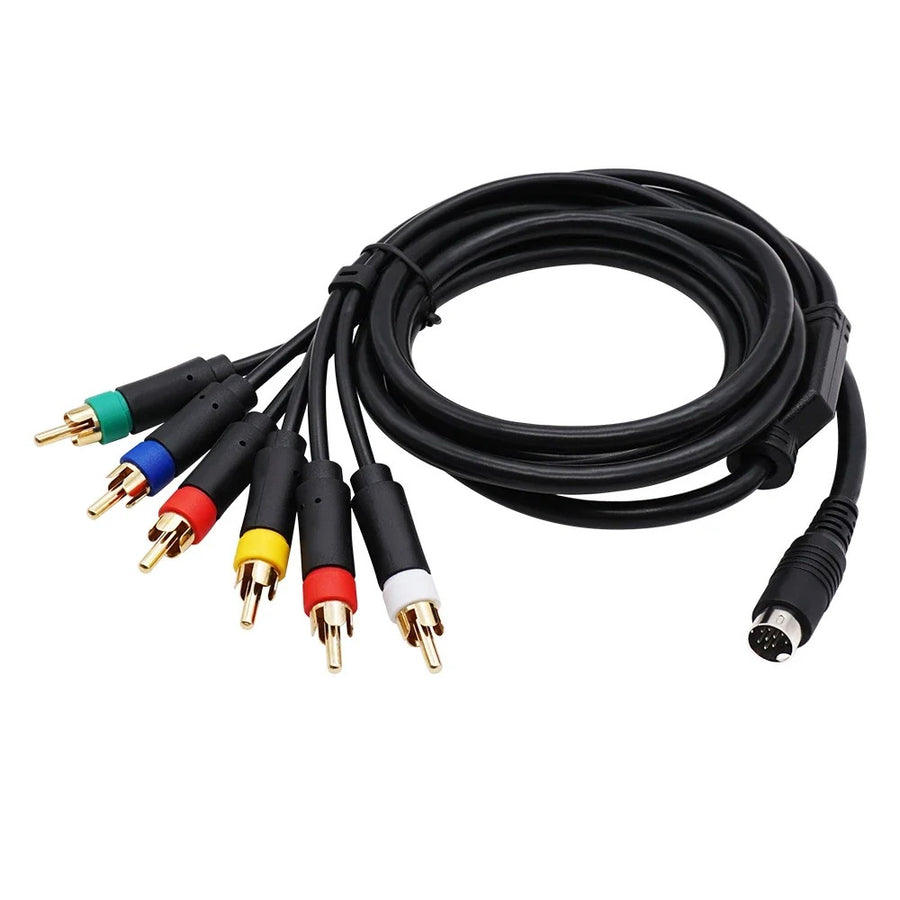
Full description
RGB cable for Mega Drive 2: leaving composite behind
The cable originally supplied with the Mega Drive 2 carries a composite signal: bleeding colours, blurry outlines, visible dithering. This RGB (RGBS) cable plugs into the console's 9-pin mini-DIN connector and carries the separate red, green and blue signals, with their sync, over 1.8 m.
What it does
- RGB signal: separate colours, a clearly cleaner image than composite.
- 9-pin mini-DIN connector: the one on the Mega Drive 2's AV output.
- 1.8 m long: enough to connect the console to a screen or a converter without strain on the cable.
What it doesn't do
- It does not output HDMI: you need a screen with an RGB input or a converter that accepts RGBS.
- It does not fit the Mega Drive 1, whose AV output is an 8-pin DIN connector.
- It does not improve the resolution: the console stays at 240p or 288p depending on its region.
Compatibility
Mega Drive 2 and consoles sharing its 9-pin mini-DIN AV connector. Not compatible with the Mega Drive 1 (8-pin DIN) or with consoles from other brands. Two versions are offered by the supplier, “with BIN” and “without BIN”: write to us before buying if you are unsure which one to choose.
Skill level required
None. You plug the mini-DIN connector into the console and the other end into the screen or the converter. No soldering, no opening of the console.
In the box
- 1 RGB (RGBS) cable, 1.8 m, for Mega Drive 2, in the chosen version
Delivery in 10 to 18 days · dispatched within 3 to 5 days · 2-year legal guarantee · 14-day returns.
RGB (RGBS) cable for Mega Drive 2 — 9-pin mini-DIN connector, 1.8 m
The RGB cable that replaces the Mega Drive 2's original composite one, 1.8 m long.
In stock
📦Dispatched within 3 to 5 business days · Delivery in 10 to 18 business days · 2-year legal guarantee · 14-day returns.
- 🇫🇷French customer service
reply within 1 business day - 🛡Legal warranty
2 years - ↩14 days
to change your mind - 🔒Secure payment
Card · PayPal · Klarna
The job: switching the Mega Drive 2 to RGB
The Mega Drive 2 can output RGB, but its original cable settles for composite. You unplug the old cable, plug this one into the mini-DIN connector at the back of the console, and the image gains sharpness: bold colours, clean gradients, readable text. No tools, no modification of the console.
The part: RGBS, the basis of a good image
RGBS carries red, green, blue and sync separately. It is the format expected by RGB SCART screens and most serious retro converters. A good RGB cable is often the first investment to make before any upscaler: without it, the converter only receives composite.
Support: choosing the right version
The supplier offers two versions of this cable. Before ordering, tell us which screen or converter you plan to use: our customer service replies within 1 business day and tells you the suitable version. The 2-year legal guarantee of conformity covers the cable you receive.
What this accessory brings
Verified manufacturer specifications · verified on
What it does well
- RGB signal, sharper than composite
- Mega Drive 2 9-pin mini-DIN connector
- 1.8 m long
What it doesn’t do
- No HDMI output
- Not compatible with the Mega Drive 1
- Original resolution unchanged
See full specifications+
Material and size
- Accessory type
- Video cable
Compatible with
- Mega Drive 2
In the box
- 1 RGB (RGBS) cable, 1.8 m, for Mega Drive 2
Information and safety
Instructions for use and legal information about the product
Origin, responsible person and contact
- Product and packaging as supplied by the manufacturer: markings may be in Chinese or English. The product's characteristics are described on this page.
- Use this product only for the purpose described on this page and follow the instructions below.
- Person responsible for placing this product on the EU market: JMR-Service (Fun-Esports). See our Terms of Sale for full contact details.
- A safety problem (overheating, burning smell, broken part)? Stop using the product and write to us at contact@fun-esports.com.
- Warranty, returns and withdrawal: see our Warranty and returns page.
Frequently Asked Questions
🔧 Does the console need to be modified?
No. The Mega Drive 2 natively outputs RGB on its AV connector: the cable plugs in directly.
🎮 Is it compatible with the Mega Drive 1?
No. The Mega Drive 1 uses an 8-pin DIN connector. This cable has a 9-pin mini-DIN connector, the one on the Mega Drive 2.
📺 Can I connect it to an HDMI TV?
Not directly. You need a converter or an upscaler that accepts RGB between the cable and the TV.
🔀 What is the difference between “with BIN” and “without BIN”?
These are the two versions offered by the supplier. Write to us before buying so that we can confirm which one suits your setup.
📦 What is in the box?
One RGB (RGBS) cable, 1.8 m, for Mega Drive 2, in the chosen version.
📏 How long is the cable?
1.8 m.
🚚 What are the delivery times?
Delivery in 10 to 18 days, dispatched within 3 to 5 days.
🛡️ What guarantee applies?
2-year legal guarantee of conformity. 14-day returns. Customer service replies within 1 business day.
Why buy here rather than on a marketplace
It is a fair question. Here is the answer, straight.
Every listing is checked before publication: real compatibility, material, dimensions, box contents. Many models never make it into the catalogue.
A question about compatibility, a fit problem, a return: you write, a human replies within 1 business day. In French.
The 2-year legal warranty of conformity is handled by us — not by a form on the other side of the world. And 14 days to change your mind, with no need to justify yourself.
We do not claim to be the cheapest. We claim that you will know exactly what you are buying before you pay.
Read this before choosing
Our guides to accessories: compatibility, protection, transport.

Manette pour smartphone : bien choisir pour le rétro et les jeux mobiles
Trois formats de manettes pour téléphone, et les critères qui départagent : port USB-C, version d'iOS ou d'Android, longueur du téléphone avec sa coque,…
9 min read · published on

Quelle manette 8BitDo choisir selon votre console et votre usage
Récepteur pour console d'origine, SN30 Pro ou Pro 3 sur Switch, Ultimate 2C ou Ultimate 2 sur PC : le tableau usage par usage…
11 min read · published on

Leverless ou stick arcade en 2026 : faut-il passer à la hitbox ?
Vous hésitez à passer au leverless ? Fonctionnement, modes SOCD et règles de tournoi en 2026, jeux concernés, temps d'adaptation, switchs et cartes GP2040-CE,…
9 min read · published on