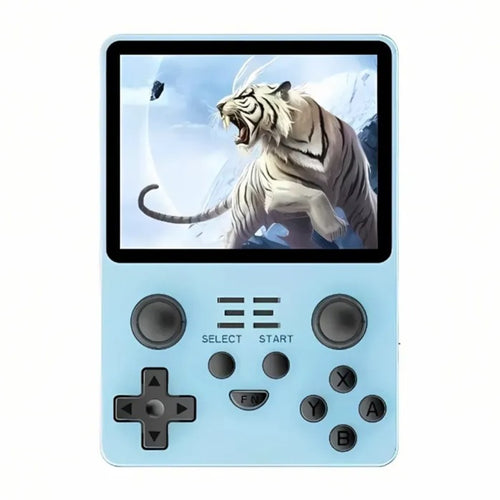
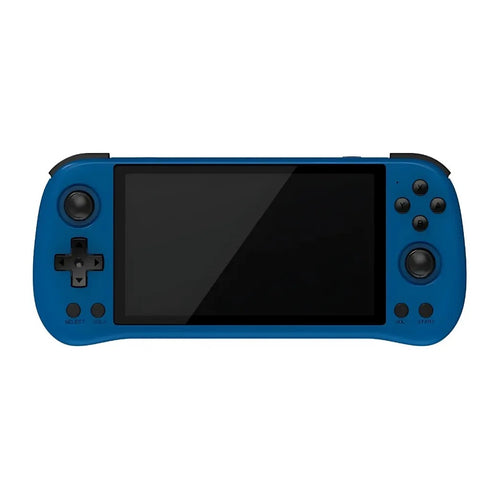
Powkiddy consoles : retro design, wide emulator compatibility and optimized performance to play your favorite classics anywhere.
Powkiddy is a brand of handheld consoles highly regarded by retro gaming enthusiasts. for its excellent value for money , the variety of its formats (vertical, horizontal, clamshell) and an offer covering both entry-level and higher-performance models. The goal: to make retro gaming simple, affordable and portable , with machines designed for NES, SNES, Mega Drive, Game Boy, PS1… and, depending on the model, PSP, Dreamcast and N64.
Powkiddy flagship models
- RGB30 — Very sharp ~4" square screen (1:1 ratio), ideal for classic handheld consoles (GB/GBC/GBA) and 2D in general; PS1 flawless.
- RK2023 — 3.5" vertical format, compact and lightweight; perfect for 8/16/32-bit + PS1 with a “Game Boy-like” grip.
- RGB10 Max 2 — 5" horizontal, comfortable ergonomics; targeted 2D/PS1 very fluid, and a good base for PSP/Dreamcast depending on the games.
- X55 — ~5.5", comfort orientation; excellent readability and very good performance for 2D/PS1, PSP/Dreamcast, more comfortable than entry-level models.
- X18S (Android, clamshell) — “clamshell console” format; more flexibility on retro 3D (PSP/Dreamcast/N64) and access to Android apps + cloud gaming.
- V90 — small clamshell model very economical; perfect for discovering retro gaming (8/16/32-bit + PS1) without breaking the bank.
Tip: Android models (e.g., X18S) offer more versatility (apps/streaming), while Linux models aim for "ready-to-play" simplicity for 2D/PS1.
Technical specifications & compatibility
- Bright IPS screens (up to 5–5.5") for good readability and accurate colors.
- Controls : precise cross, ABXY, triggers; presence of analog sticks depending on the model (useful for 3D/PSP).
- Systems : Linux (interface dedicated to retro) or Android (emulators, apps, cloud/streaming).
- Connectivity : Wi-Fi/Bluetooth (depending on model) for scraping game covers, connecting controllers or using cloud gaming.
- Storage : microSD for the system and your ROMs; easy to expand or clone.
- Compatibility : excellent on NES, SNES, Mega Drive, PC-Engine, Neo-Geo, GB/GBC/GBA and PS1 ; PSP/Dreamcast/N64 very good on the higher-performance models, case by case for GameCube/Wii.
Powkiddy vs other retro consoles
- Compared to competing compact Linux consoles : Powkiddy is often more aggressive in pricing and offers many formats.
- Compared to Android consoles in the same segment : Powkiddy focuses on a good price/ergonomics balance; Other brands may offer superior finishes but at a higher cost.
- Compared to Windows consoles (which are much more powerful): incomparable in performance… and budget. Powkiddy remains the perfect budget solution for 2D/PS1 and some retro 3D.
Advantages & disadvantages
Benefits
- Very competitive price/quality ratio , wide choice of formats.
- Simplicity on Linux models, good versatility on Android.
- Active community (tutorials, firmwares, emulator profiles).
Disadvantages
- Finish/QC varies depending on series and generation (to be checked in reviews).
- Original software sometimes needs improvement → interest in alternative firmwares on Linux, dedicated Android launchers.
- Advanced retro 3D (GameCube/Wii): remains limited or “case-by-case” in this price segment.
How to choose your Powkiddy?
-
Games targeted :
- 2D/16-bit + PS1 → RGB30, RK2023, V90, RGB20S (excellent for beginners).
- PSP/Dreamcast/N64 → X55 , RGB10 Max 2 (Linux comfort) or X18S (Android) for more flexibility.
-
System :
- Linux → simplicity, retro frontends, minimal configuration.
- Android → various emulators, apps & cloud, more settings.
- Format & ergonomics : 3.5" ultra-portable vs 5–5.5" for visual comfort (weight/handling).
- Screen : Bright IPS; 1:1 (RGB30) screens look great for GB/GBC.
- Battery : check the capacity, charge and battery life advertised per use.
- Controls : presence/quality of the sticks if you play 3D or twin-stick games.
- Ecosystem : availability of firmware/launchers and guides for your model.
Getting started: our usage tips
- Use a high-quality microSD card (U3) and back up your data.
- Update the firmware (Linux) or install a launcher (Android) for clear navigation (library by system, covers, favorites).
- Adjust your emulation profiles (video rendering, frequency, mapping) per system for optimal smoothness.
- For cloud gaming (Android): try Xbox Cloud/GeForce NOW, or local streaming from your PC.
- Respect the legality of ROMs (personal backups), avoid "ready-made" packs of dubious origin.
In summary, Powkiddy offers accessible and efficient consoles to enjoy retro gaming everywhere. Define your priorities (simple Linux or versatile Android, format, screen, sticks), choose the appropriate model and Take care with your setup: you'll get a smooth and fun experience, at the right price.
❓ Powkiddy FAQ
🎯 What is Powkiddy and who is the brand aimed at?
Powkiddy manufactures portable consoles dedicated to retro gaming with an excellent price/quality ratio . They are aimed at gamers who want a simple machine for 8/16/32-bit and PS1 systems. and depending on the models, access to retro 3D (PSP/Dreamcast/N64).
🧭 Which Powkiddy model should I choose based on my needs?
- Budget 2D/PS1 compact → RGB20S , RK2023, RGB30.
- Comfortable 5–5.5" screen + a little 3D → RGB10 Max 2 , X55 .
- Android versatility (apps/cloud/retro 3D) → X18S (clamshell).
- Economy clamshell format → V90.
Tip: Check for the presence of analog sticks if you play 3D or twin-stick shooters.
🕹️ What systems can Powkiddy play?
Perfect : NES, SNES, Mega Drive, PC-Engine, Neo-Geo, GB/GBC/GBA, PS1 .
Very good (depending on model/settings) : PSP , Dreamcast , N64 .
Not recommended for : GameCube, Wii, PS2 and beyond.
For PSP/Dreamcast/N64, opt for higher-performance models such as RGB10 Max 2 Or X55 .
Recommended emulators: DuckStation (PS1), PPSSPP (PSP), Flycast (Dreamcast), Mupen64Plus-Next (N64), RetroArch for centralization.
⚙️ Linux or Android: which to choose on Powkiddy?
- Linux → simplicity "ready to play", lightweight configuration, ideal for 2D/PS1.
- Android → more versatility (apps, cloud gaming, fine-tuning), better potential in retro 3D.
Choose Android if you also want mobile games/streaming; otherwise Linux is sufficient for a plug-and-play retro experience.
💶 How much does it cost?
Indicative price ranges : entry-level ~€50–100, mid-range ~€100–160, higher-performance models ~€160–250+.