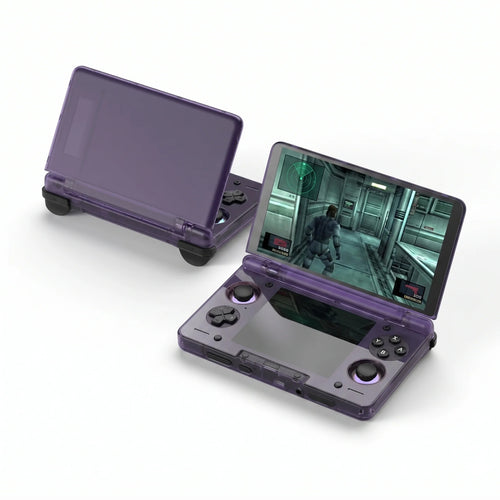
Ayn handheld consoles for Android, Odin 2, Mini, and Portal. Advanced emulation, cloud gaming, premium screen, precise ABXY controls. Discover the range
About Ayn
Ayn Consoles (AYN inc .) are among the leading Android devices for portable gaming: They combine performance, screen quality ( panel / screen ) and precise ABXY controls. Ideal for cloud gaming , Play Store games ( APK ), and advanced emulation, with a community known for its guides and customer reviews . Whether you're a beginner or looking for a powerful and "at" machine " Easy to use " on a daily basis, the range covers the essential uses.
Ayn in brief
The Ayn family made its mark with Odin , then established itself with Odin 2 (Snapdragon 8 Gen 2 — High-performance CPU / SoC ). In 2025, the catalog includes Odin 2 Mini (5" format), Odin 2 Portal (7" OLED, 120 Hz) and Thor ( dual-screen clamshell). A Loki (Windows) lineage also existed on the Ayn side for PC libraries.
Flagship models and for whom?
- Odin (Lite / Base / Pro) — Android: excellent base for emulation up to PS2/GameCube (depending on games and settings).
- Odin 2 — 6", Android 13, Snapdragon 8 Gen 2: versatile, perfect for cloud and mobile gaming.
- Odin 2 Mini — 5" MiniLED: ultra-portable, ideal for on-the-go use while still having power reserve.
- Odin 2 Portal — OLED 7" 120 Hz: visual immersion, long sessions, great in the living room via dock/monitor.
- Thor — Dual-screen clamshell format: mobility and multi-use (streams, chat/Discord, Android games).
- Loki (Windows) — Native access to PC games (launchers), a Windows alternative “ at Ayn’s”.
Tip: For a "home console" feel, use a video dock and play on a monitor /TV with an Xbox controller.
New products from Ayn
- Odin 2 Portal — large OLED 7", Wi-Fi up to 7, precise ABXY controls ( Xbox -type orientation).
- Odin 2 Mini — 5" format: perfect for everyday use and Android games .
- Thor — Dual-screen clamshell: convenient on the go, Discord/ chat + game at the same time.
What makes the difference
- Display : IPS/MiniLED/OLED depending on model, smooth rendering up to 120 Hz (Portal).
- Controls : Hall sticks, analog triggers, ABXY / BAYX buttons (a nod to “ Joycon ” for those who are used to it).
- Systems : Android 13 (flexibility APK /stores) and Windows options (Loki).
- Connectivity : Wi-Fi/BT, easy connection to services (Xbox, Playstation Remote, Discord).
- Battery life : generous batteries for long sessions without compromise.
Compatibility & performance
Native Android : Play Store games, APK installation, quick optimizations. Cloud & Remote : Xbox Cloud, PS Remote Play, Steam Link, Moonlight (take your PC/console games ). Emulation : from 8/16/32-bit to PS1/PSP/Dreamcast/N64, with PS2/GameCube/Wii possibilities on Odin 2/Portal (depending on titles/settings).
Ayn Accessories & Controllers
To optimize the experience: hard case , screen protector , fast microSD cards, Video docks , grips /cases, and BT/USB controllers ( ABXY layout, Xbox type) in order to play in table/TV mode with controlled latency.
Advantages & disadvantages
Benefits
- High performance ( CPU / Snapdragon SoC ), superb screen (OLED possible).
- Android versatility: APK , emulators, cloud/remote.
- Precise controls ( ABXY , Hall sticks), good ergonomics, comfortable to use.
Disadvantages
- Settings required for certain demanding systems (PS2/GC/Wii).
- Larger Portal format: to be evaluated according to your hands/uses.
How to choose your Ayn?
- Format & use : 5" ultra-portable (Odin 2 Mini) / 6" balanced (Odin 2) / OLED 7" immersion (Odin 2 Portal).
- Target games : Native Android + cloud gaming / advanced emulation (check ABXY / BAYX , “ joycon -like” if needed).
- Display : IPS/MiniLED vs OLED (deep blacks, 120 Hz on Portal).
- Ecosystem : Xbox / PlayStation services, Discord , dock/monitor connection .
Why choose Ayn?
Compared to Windows laptops (ROG Ally , MSI Claw, AYANEO/ AYA ), Ayn stands out because of its Android simplicity, its battery life, and its power-to-size ratio. An excellent choice if you want a “daily driver” to play, test settings and enjoy a smooth mobile experience.
Quick recap (recommended use)
- Compact & portable → Odin 2 Mini
- Performance/format balance → Odin 2
- Immersion & lounge → Odin 2 Portal
Need personalized advice or compatible accessories? Discover our Ayn selection, shipped in Express , and find the console best suited to your needs.
✅ Product sheet: Ayn Odin 2 Portal – Fun-Esports
✅ The entire Ayn collection: Ayn Consoles – Fun-Esports
❓ Ayn FAQ
🎯 Which Ayn console should you choose?
Choose according to your needs:
- Compact & portable → Odin 2 Mini (5" format), Android, perfect for playing anywhere.
- Performance/format balance → Odin 2 (6", Snapdragon 8 Gen 2 CPU/SoC , excellent natively & in the cloud).
- Immersion & living room → Odin 2 Portal (OLED 7" 120 Hz, large panel/screen ).
- Clamshell & multi-purpose format → Thor (dual-screen, practical for Discord/ chat + game).
See the full range: Ayn Consoles – Fun-Esports .
🎮 Which games & systems are compatible?
- Native Android : Play Store games and APKs (action, indie, racing…).
- Cloud & Remote : Xbox Cloud Gaming, PS Remote Play ( playstation ), Steam Link, Moonlight (your PC/console games on the move).
- Emulation : 8/16/32-bit up to PS1/PSP/Dreamcast/N64, with PS2/GameCube/Wii support via Odin 2/Portal (depending on games/settings). Legally use your own game saves.
🧩 What is the difference between Odin 2, Odin 2 Mini, Odin 2 Portal and Thor?
- Odin 2 Mini : 5" MiniLED, ultra-portable.
- Odin 2 : 6" 1080p, versatile for everyday use.
- Odin 2 Portal : OLED 7" 120 Hz, premium visual experience.
- Thor : dual-screen clamshell phone, mixed use (gaming + apps/communication).
The four rely on Android, Hall sticks and precise ABXY buttons (orientation close to Xbox ).
📺 Can I play on TV/monitor?
Yes. With the compatible Super Dock , you can output the image to a monitor /TV, connect a keyboard/mouse or controllers, and enjoy a “living room console” mode.
☁️ Does cloud gaming work well?
Yes. On recent Ayn consoles (Odin 2 / Portal / Mini), Xbox Cloud Gaming and Remote Play are very smooth if your Wi-Fi is stable (preferably 5 GHz/6 GHz) and the speed/latency is good.
🔋 Battery life & charging: what can I expect?
- Odin 2 / Portal : large batteries for long sessions.
- Reduce brightness, limit 120Hz when unnecessary, close background apps to save battery life.
- Use a quality USB-C charger and a certified cable.
💾 Storage: microSD or internal?
Android handles APKs /data very well on a fast microSD card (U3 recommended). Keep the internal storage for apps, and the microSD card for libraries/ROMs and media.
🎯 Button Commands & Mapping
The Ayn controllers feature Hall effect sticks and ABXY buttons. You can map the controls (including BAYX ) and create combos to suit your preferences. Remember to test the stick/trigger sensitivity in the settings.
🔄 APK Updates & Installation
- Apply system updates/manufacturer settings before playing.
- For APKs , use trusted sources and allow installation from unknown sources with caution.
- Enable cloud backups if available.
🛒 Where to buy an Ayn console on Fun-Esports?
Directly from our shop:
- ✅ Product sheet: Ayn Odin 2 Portal – Fun-Esports
- ✅ The entire collection: Ayn Consoles – Fun-Esports